
.jpeg)
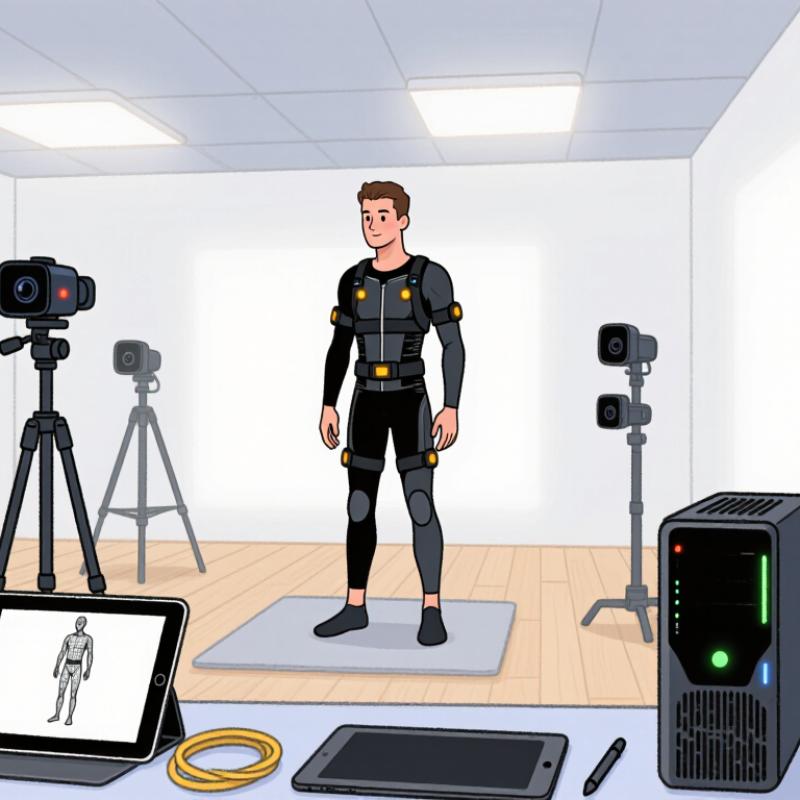
Affordable motion capture is no longer reserved for large studios with dedicated stages. Small production teams can now combine inertial suits, smartphone cameras, markerless software, and modest lighting setups. The right choice depends on the required movements, the crew's skills, and the available cleanup time. While a suit may capture fast movements effectively, a phone-based setup can simplify basic motion testing. However, every system requires careful preparation, as foot sliding, occlusion, and noisy data can still affect the final animation.
The global motion capture market was estimated at $186.2 million in 2023, with Grand View Research projecting a 12.2% compound annual growth rate from 2024 to 2030. Although this reflects broader industry growth, it does not guarantee affordable solutions for small teams. Instead of focusing solely on technical specifications, production teams should select tools that support their actual creative requirements.
This guide explores practical motion capture workflows, equipment options, software considerations, and budget trade-offs to help smaller teams identify suitable solutions before making significant investments.
## Understanding Motion Capture Needs in Small-Scale Production
Small production teams should define their motion capture requirements before comparing different systems. A team recording seated dialogue has different needs from one capturing full-body movements across a room. Important considerations include the number of performers, movement range, recording duration, and required output formats.
For example, projects involving detailed finger movements require more precise tracking than those focusing on general body positioning. Testing a representative scene with turns, quick gestures, and overlapping movements can help identify potential limitations.
Available space and staffing also influence equipment selection. Small offices with low ceilings, reflective windows, or limited floor space may restrict camera placement. Teams should also consider whether someone can monitor recordings while directing performers.
Post-production requirements deserve equal attention. Check software compatibility, supported export formats, and the amount of manual correction required. Recording time is only one part of the process; calibration, retakes, file management, and data cleanup must also be included in project planning.
## Comparing Marker-Based, Markerless, and Inertial Systems
Marker-based motion capture uses reflective or illuminated markers tracked by multiple cameras. It can provide accurate movement data for applications requiring repeatable body mechanics, such as recording hand interactions with tools. However, markers can become hidden when performers cross their limbs or interact with props. These systems also require calibrated capture spaces and additional preparation.
Markerless systems analyze camera footage to estimate body positions without requiring performers to wear tracking markers. They are convenient for quick rehearsals and offer greater flexibility in clothing choices. However, lighting conditions, loose clothing, and complicated backgrounds can affect tracking accuracy.
Inertial motion capture systems use wearable sensors equipped with accelerometers and gyroscopes. They are particularly useful in compact rooms or situations where cameras cannot maintain clear visibility. Nevertheless, sensor drift, calibration requirements, and positioning accuracy remain important considerations.
MarketsandMarkets estimated the motion capture market at $169 million in 2023 and projected growth to $326 million by 2028, representing a 14.1% compound annual growth rate. These figures indicate increasing industry adoption but do not necessarily mean lower equipment prices.
Small teams should compare complete workflows rather than individual specifications. Recording a turn, crouch, and prop interaction can reveal differences in tracking accuracy, performer comfort, and post-production requirements.
## Selecting Affordable Cameras, Sensors, and Tracking Gear
Affordable motion capture begins with selecting equipment according to the movements being recorded. Standard webcams typically cost between $20 and $100 per camera and provide an accessible starting point for basic body-pose references, facial references, and simple experiments. Most support 30 frames per second, while some models offer 60 fps. Their performance depends heavily on lighting, camera placement, resolution, and subject visibility.
Smartphone cameras offer another convenient option. Existing devices can be used at no additional equipment cost, while new smartphones may cost approximately $150–$700. They support portable reference capture, small production environments, and location testing. Depending on the device, recording settings, and software, capture rates commonly range from 30 to 60 fps or higher. A tripod and sufficient storage space can improve recording consistency.
Depth cameras generally cost approximately $100–$500 and use active or stereo depth sensing to estimate spatial positions. They are suitable for indoor body tracking, rough spatial capture, and interactive prototypes. However, working distance, sunlight, reflective surfaces, and depth noise can influence performance. Most operate around 30 fps, depending on the device and recording mode.
For teams requiring better body visibility, a two-camera video setup may cost approximately $100–$600 for two entry-level cameras, excluding the computer. Multiple camera views support triangulation and pose estimation, making this approach useful for small capture spaces. However, synchronization, calibration, overlapping camera views, and stable mounts are essential for reliable results.
Inertial motion sensor kits typically cost between $300 and $2,000 for entry-level multi-sensor configurations. These systems attach sensors to the performer's body and record movement using inertial measurement units. They are useful when cameras are impractical or performers frequently turn away from the recording equipment. Buyers should evaluate sensor quantity, battery life, comfort, calibration requirements, and supported export formats.
Optical marker tracking is generally more expensive, with multi-camera systems costing several thousand dollars or more. These systems use multiple cameras to track reflective or illuminated markers within a controlled capture area. They are better suited to projects requiring higher precision or dedicated motion capture facilities. Camera calibration, controlled conditions, and marker cleanup add to their overall costs.
Supporting equipment also affects recording quality. Tripods and camera clamps typically cost $15–$80 per mount and provide stable, repeatable camera positioning. Continuous LED lighting generally costs $30–$200 per light or small kit and helps improve exposure in dim environments. Teams should select stable mounts and consistent lighting arrangements while checking for flicker at the chosen recording frame rate.
A capable capture computer may cost approximately $500–$1,500, with additional expenses for storage. Computer requirements depend on the recording software, resolution, number of cameras, and processing workload. Before purchasing a workstation, teams should review software requirements and estimate storage needs using sample recordings.
All equipment prices are indicative USD estimates rather than live quotations. Actual costs vary according to region, configuration, software, and whether products are purchased new or used.
## Evaluating Software, Calibration, and Data Export Options
Motion capture software should support the production team's actual workflow rather than simply offering impressive demonstrations. Important features include camera compatibility, live preview, recording management, and export formats that integrate with existing animation tools.
Calibration is another essential step. Cameras should remain securely positioned, while reflective objects and unnecessary clutter should be removed from the capture area. Teams can test a slow arm movement followed by a quick turn to identify tracking gaps, jitter, and drifting markers.
Data export compatibility can significantly influence production efficiency. Confirm whether exported files preserve frame rates, timestamps, joint names, and scale information. Importing a sample recording into the actual animation pipeline helps identify potential problems before a full production session.
Teams should also maintain untouched copies of raw recordings alongside cleaned motion files. Organized folders, consistent naming conventions, and calibration notes make it easier to locate and compare different takes.
## Building a Reliable Capture Workflow in Limited Space
A reliable capture workflow begins with measuring the available room rather than purchasing additional equipment. Production teams should mark a clear recording area and remove unnecessary furniture, cables, and reflective objects that may interfere with tracking.
Cameras and sensors should be positioned consistently, with enough space for performers to complete their required movements. A short test recording can help identify framing problems, foot sliding, and occlusion before the main session begins.
Documentation also improves repeatability. Record camera positions, lighting conditions, calibration settings, and file naming conventions for every session. In particularly small rooms, recording one performer at a time can reduce blocking and simplify data review.
According to the U.S. Bureau of Labor Statistics, employment for special effects artists and animators was projected to grow by 8% between 2022 and 2032, with approximately 9,900 openings expected annually. This outlook highlights the value of workflows that are practical, teachable, and easy to maintain.
## Estimating Costs, Trade-Offs, and Future Upgrade Paths
Motion capture expenses extend beyond the initial equipment purchase. Small production teams should account for software subscriptions, recording space, calibration, data cleanup, and storage requirements.
Camera-based systems may reduce equipment costs but can struggle with occlusion when performers turn away or interact with objects. Inertial systems offer greater flexibility in restricted spaces but introduce calibration and sensor drift considerations.
The U.S. Bureau of Labor Statistics reported a median annual wage of $99,060 for special effects artists and animators in May 2023. Although this figure does not represent motion capture cleanup costs, it illustrates why additional production labor can quickly outweigh initial equipment savings.
Before investing in a complete system, teams should record a short test scene involving walking, turning, and hand interactions. Compare setup time, usable recordings, and cleanup hours to determine the actual cost of each workflow.
A staged upgrade strategy can help control spending. Begin with basic recording equipment, improve camera coverage when necessary, and introduce more advanced tracking tools only when specific production requirements justify the investment. Renting equipment or conducting a limited pilot project can also reduce purchasing risks.
## Conclusion
Affordable motion capture provides small-scale production teams with practical opportunities to improve animation workflows without investing in large studio facilities. Marker-based, markerless, and inertial systems offer different balances of accuracy, convenience, and equipment requirements.
Selecting suitable cameras, sensors, tracking accessories, and software requires careful consideration of recording conditions, production objectives, and available budgets. Teams should also evaluate calibration procedures, data export compatibility, and post-production workload before making purchasing decisions.
By starting with a practical test setup, maintaining consistent recording conditions, and upgrading equipment gradually, small production teams can build reliable motion capture workflows that support their creative requirements and long-term production growth.
Virdyn
Virdyn
+862083980063 ext.
virdyn@outlook.com
Legal Disclaimer:
EIN Presswire provides this news content "as is" without warranty of any kind. We do not accept any responsibility or liability for the accuracy, content, images, videos, licenses, completeness, legality, or reliability of the information contained in this article. If you have any complaints or copyright issues related to this article, kindly contact the author above.
